 Now Available on Windows & Android
Your All-in-One
RF Workspace
Professional RF analysis on Windows & Android — S-parameter plotting, circuit simulation, impedance matching, SNP batch processing. Free Basic · Pro $29.99 one-time.

Download RF View
Free to download. Pro features available as a one-time purchase.
RF View for Windows
Version 1.0.2 · Windows 10/11 64-bit
Windows 10/11 (64-bit)
200MB disk space
4GB RAM recommended
Basic: Free · Pro: $29.99 (one-time)
RF View for Android
Version 1.0.2+3 · Android 8.0+
Android 8.0 (API 26)+
Basic features free
Pro upgrade available in-app
Free · In-app Pro purchase available
Everything an RF Engineer Needs
From S-parameter visualization to impedance matching synthesis — RF View covers every stage of your RF design workflow.
Open SNP / S2P files, compare multiple traces on one chart. dB, VSWR, Phase, Group Delay, Smith chart — all with multiple markers.
Build circuits with R, L, C, T-line, and S2P blocks. Simulate multi-port networks and send results directly to the Plot tab.
One-click L/C lumped matching network synthesis. Instantly visualize frequency response as you adjust component values.
Synthesize microstrip line matching networks with automatic width/length calculations and real-time graphical feedback.
Bridge simulations to PCB reality. Auto-substitute ideal values with real Murata inductors and capacitors (Real Match).
Monte Carlo simulation evaluates manufacturing yield by modeling component tolerances and physical drift across multiple runs.
Batch-convert Touchstone files: port mapping, format rewrite, frequency resampling, SxP→S2P slicing, and CSV export.
Band/Freq calculator, Filter design, Microstrip line calc, Attenuator (T/Pi), S11↔Z converter, Q/Loss calculator, and more.
RF View for Windows Desktop
A full-featured RF engineering workstation. Load Touchstone files, analyze S-parameters, simulate circuits and control your VNA — plus batch-analyze hundreds of SNP files with the Analysis tab (Pro).


Visualize RF Data with Precision
Open and compare multiple SNP files on a single interactive chart. Extract critical values with smart markers and review them in a clear summary table.
- Open S1P / S2P / S3P / S4P Touchstone files instantly
- Compare multiple files on one chart with color-coded traces
- Smith chart with trace, marker, data, and Q-circle overlays
- Multiple markers: Single, Table, Delta, BW Mkr, FN modes
- Spec Limits (Pass/Fail) lines with drag & drop editing
- De-embedding support — remove fixture effects
- Export to CSV or save annotated SNP files

Build & Simulate RF Circuits
Construct multi-port RF circuits using ideal or real components. Run full-wave simulations and transfer results directly to the Plot tab.
- R / L / C components in series or shunt configuration
- Ideal & Real T-line blocks (Z₀, θ / W, L microstrip)
- S2P DUT block — load measured device data
- Composite blocks (SE parallel L/C, SH series LC/LR)
- Schematic view with component value labels
- Save / load circuits as .pcfs config
- Send Sim_Result to Plot tab with port/DUT header

One-Click Matching Network Design
Automatically design L/C lumped matching networks. Instantly visualize frequency response changes as you adjust component values.
- Ideal lumped element (L/C) matching synthesis
- Real microstrip line matching with W & L calculation
- Target impedance / return loss tuning range
- Ideal / Real mode toggle per component
- S1P / S2P input — both ports independently matchable
- Real Match: auto-substitute Murata component combos

VNA Direct Control
Control Keysight ENA / PNA series Vector Network Analyzers directly from RF View Desktop — no manual file transfers required.
- GPIB / USB connection to ENA (E5xxx) and PNA (N52xx) series
- Trigger sweeps and automatically save SNP files to PC
- Capture screenshot images directly from VNA display
- Auto-detect ENA vs PNA and apply correct SCPI commands
- 10 fallback image capture options for maximum compatibility
- Saved files instantly loaded into the Plot tab

Batch S-Parameter Analysis
Load hundreds of SNP files at once. Run automated Pass/Fail against spec limits, visualize lot-to-lot variation, and export structured comparison tables — all in seconds.
- Drag & drop hundreds of .s1p/.s2p/.s3p/.s4p files at once
- Automatic Pass/Fail evaluation against defined spec limits
- Lot-to-lot overlay plot — spot outliers and process drift instantly
- Export summary tables to CSV for Excel / reporting
- Generate PowerPoint reports automatically (Gen PPT)
- Works with Monte Carlo tolerance spread visualization


Auto PowerPoint Report
Generate formatted .pptx presentation slides directly from your RF analysis — one-click from measurement data to presentation-ready slides.
- Generate slides from Plot, Simulator, or Analysis results
- Includes pass/fail summary tables and overlay charts
- Configurable title, date, project name per report
- Batch mode: one slide per file or summary slide for all
- Saves hours of copy-paste report preparation

Evaluate Manufacturing Yield
Perform robust Monte Carlo simulations to assess how component tolerances and physical drift affect your design's real-world performance.
- Monte Carlo simulation with configurable run count
- Visualize performance spread across all simulated runs
- Identify worst-case and nominal performance boundaries
- Component drift modeling for physical parameters (W, L)
- Works seamlessly with existing circuit setups

Powerful Touchstone File Processing
Manage and convert Touchstone files with powerful batch tools. Perform advanced operations like port mapping, frequency resampling, and CSV exports in seconds.
- SNP → Data Summary Table / Wide CSV export
- SxP → S2P port slicing
- dB ↔ Re/Im format conversion
- Port Change: port mapping & reordering
- Freq. Change: range crop & frequency resampling
- Align 2 SNPs to same frequency points
- Batch process multiple files at once
Handy Calculators, Always at Hand
A versatile collection of everyday RF engineering calculators — instantly compute parameters without leaving the app.

RF View Windows Desktop in Action
Scroll to explore — every tool you need for professional RF analysis on one screen.
RF View on Android
Core RF tools optimized for your Android phone — S-parameter analysis, circuit simulation, impedance matching, and more.
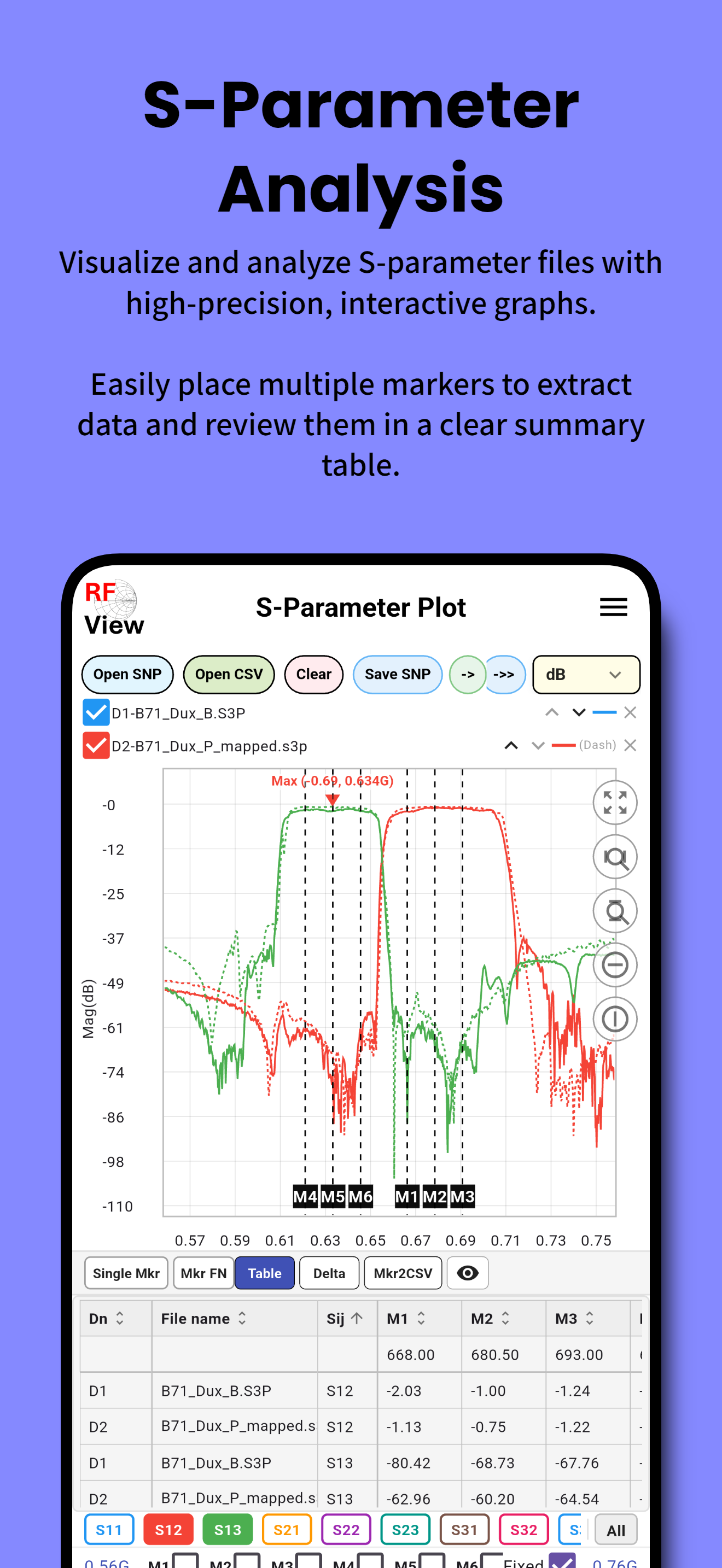
S-Parameter
Analysis
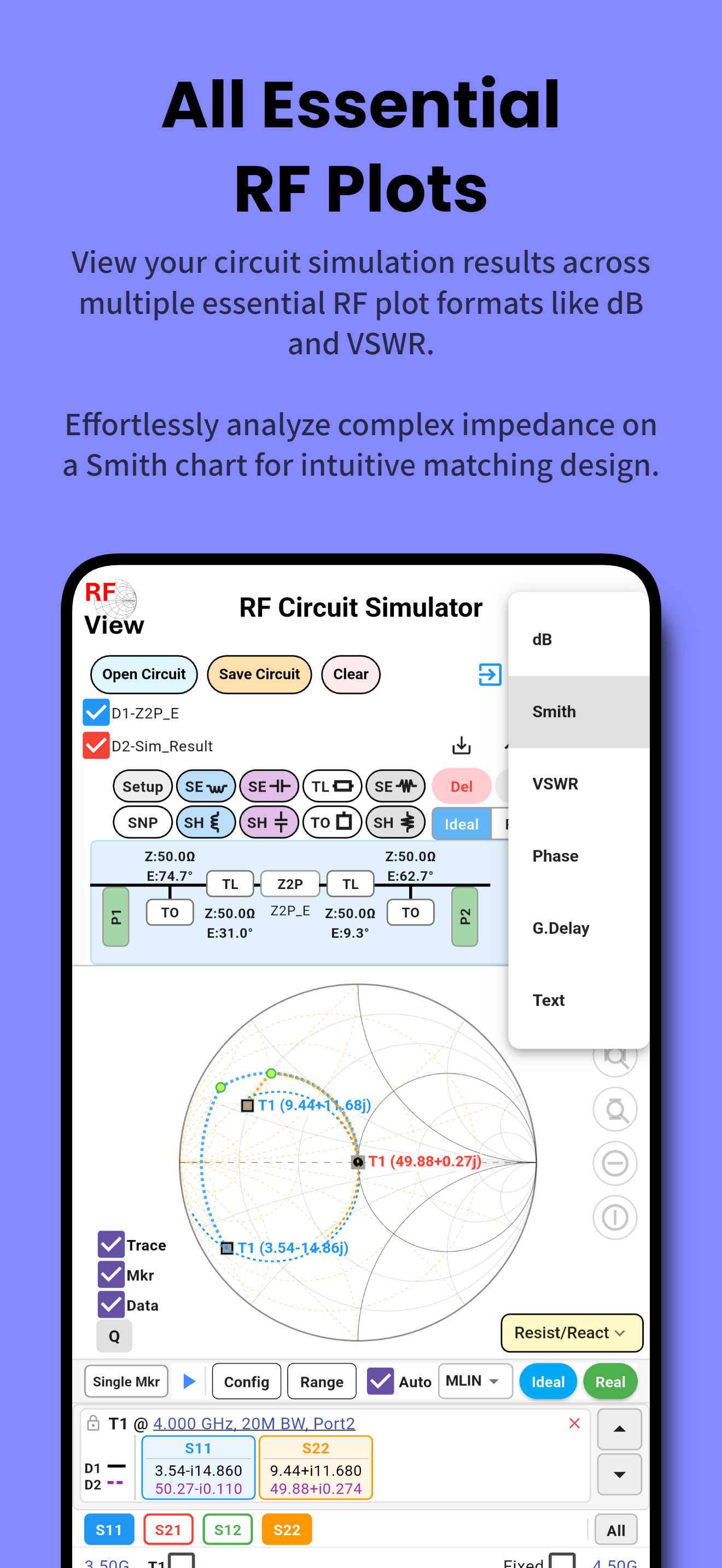
RF Circuit
Simulator
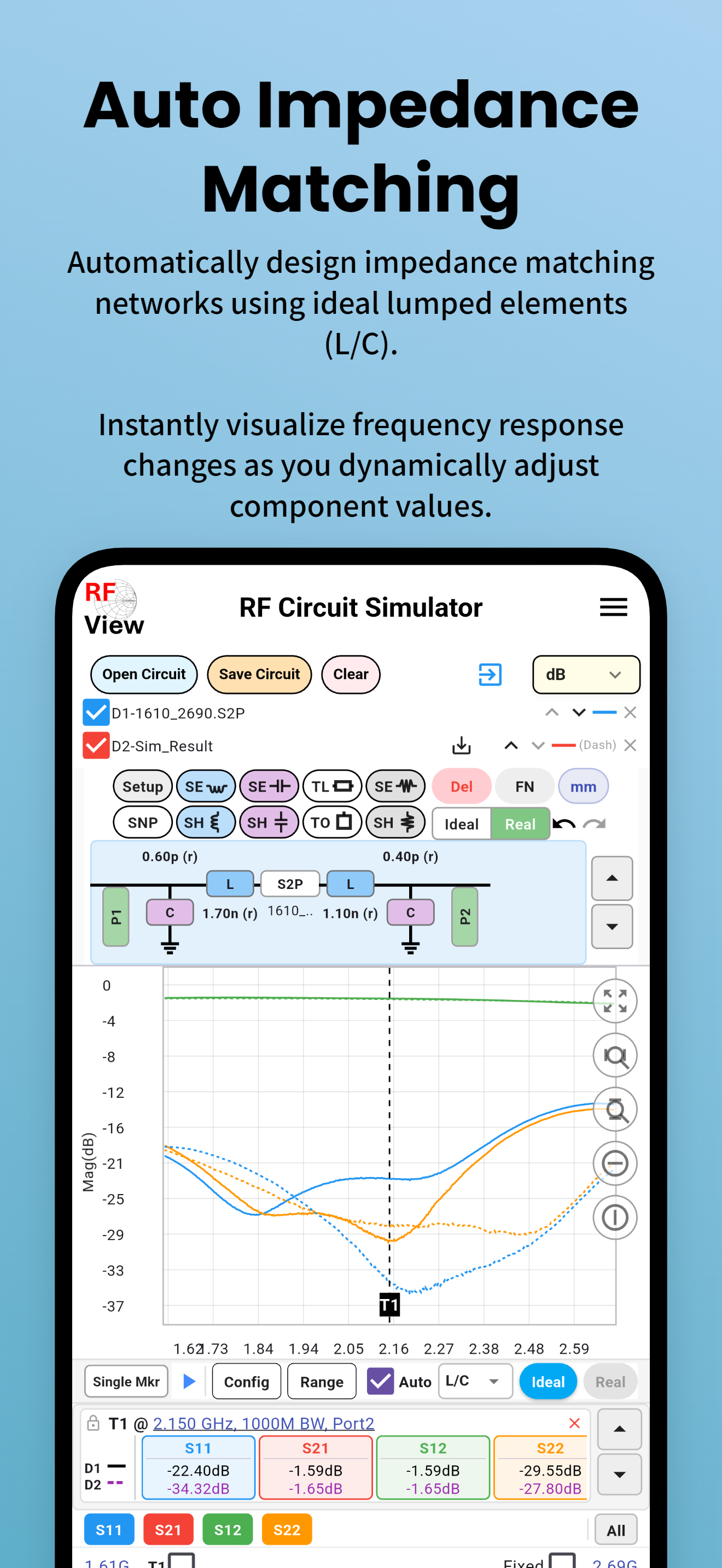
Auto Impedance
Matching
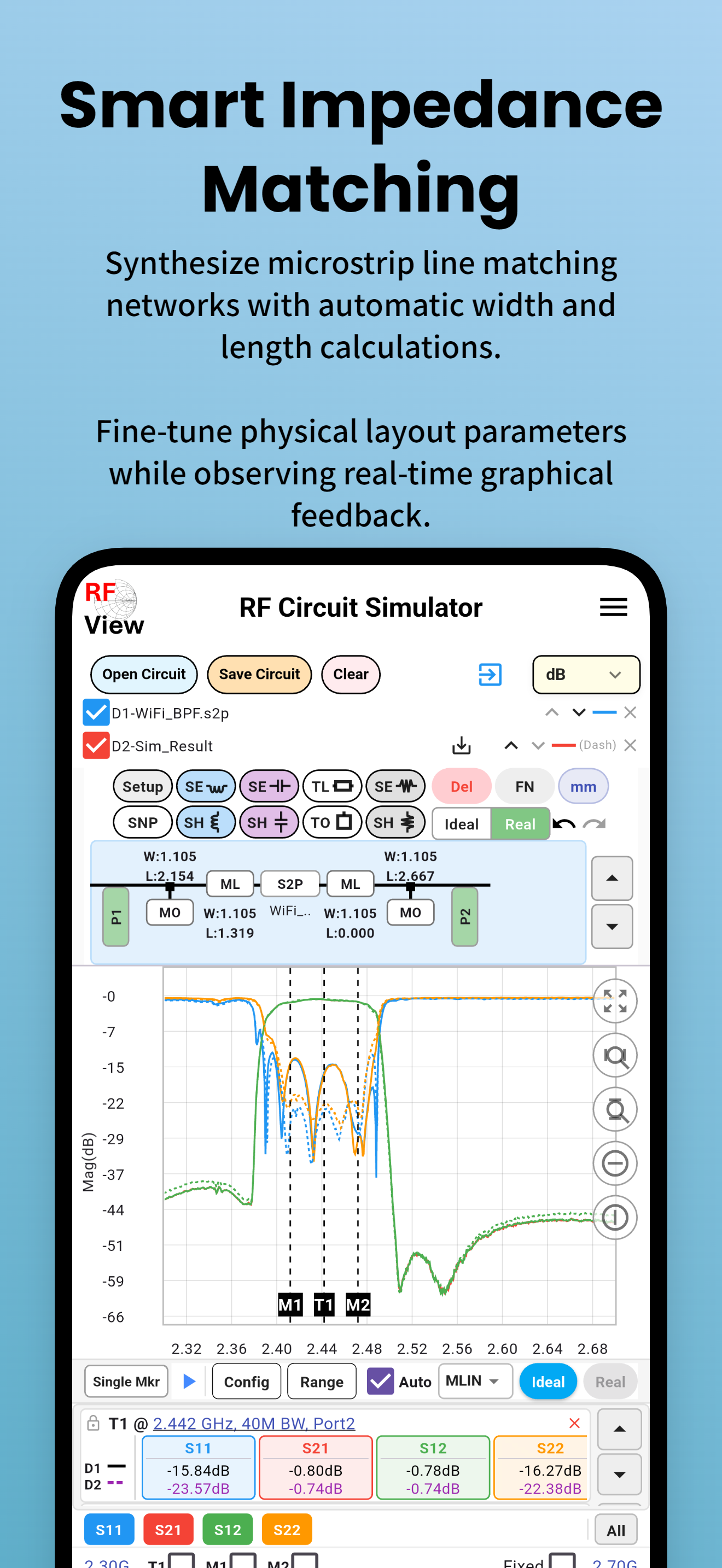
Microstrip
Matching
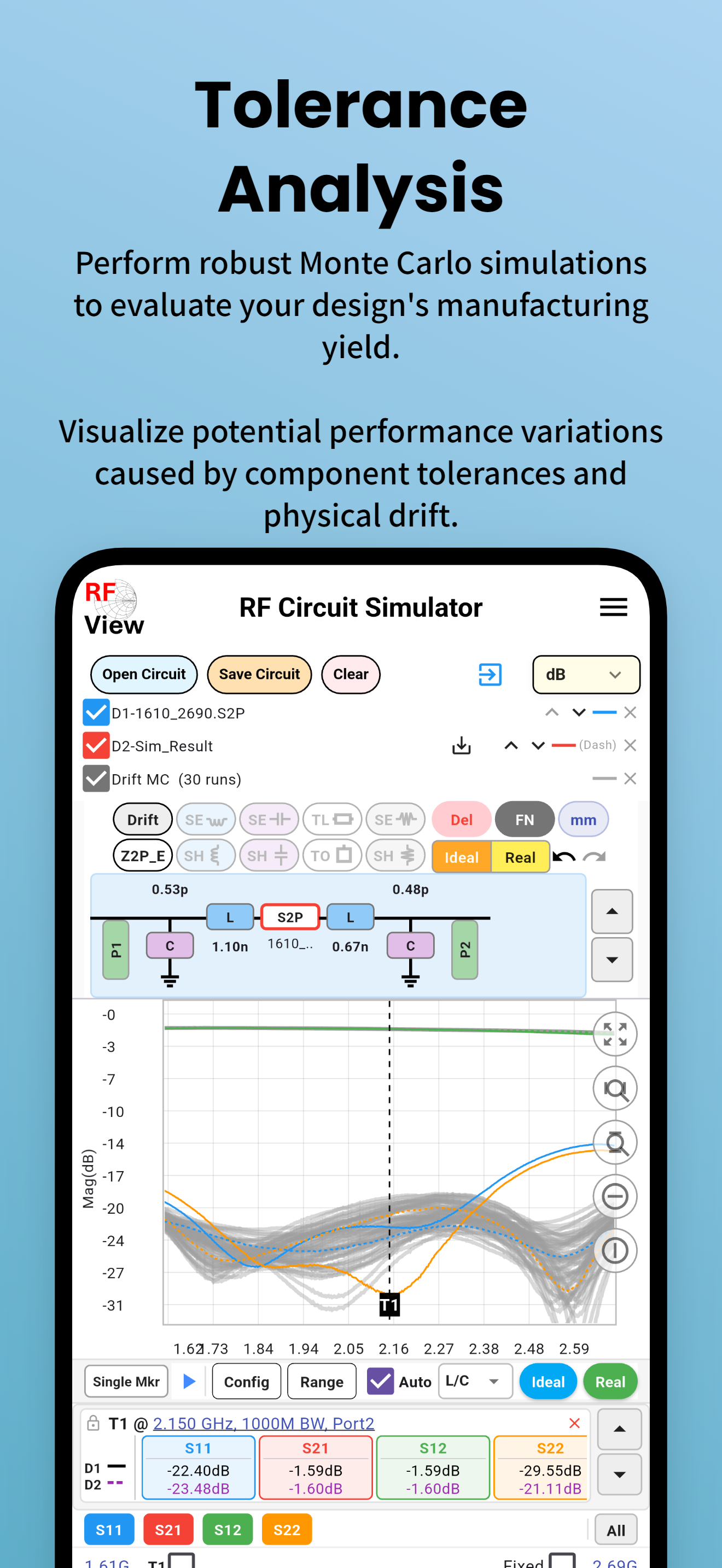
Tolerance /
Monte Carlo

SNP Converter
& Batch
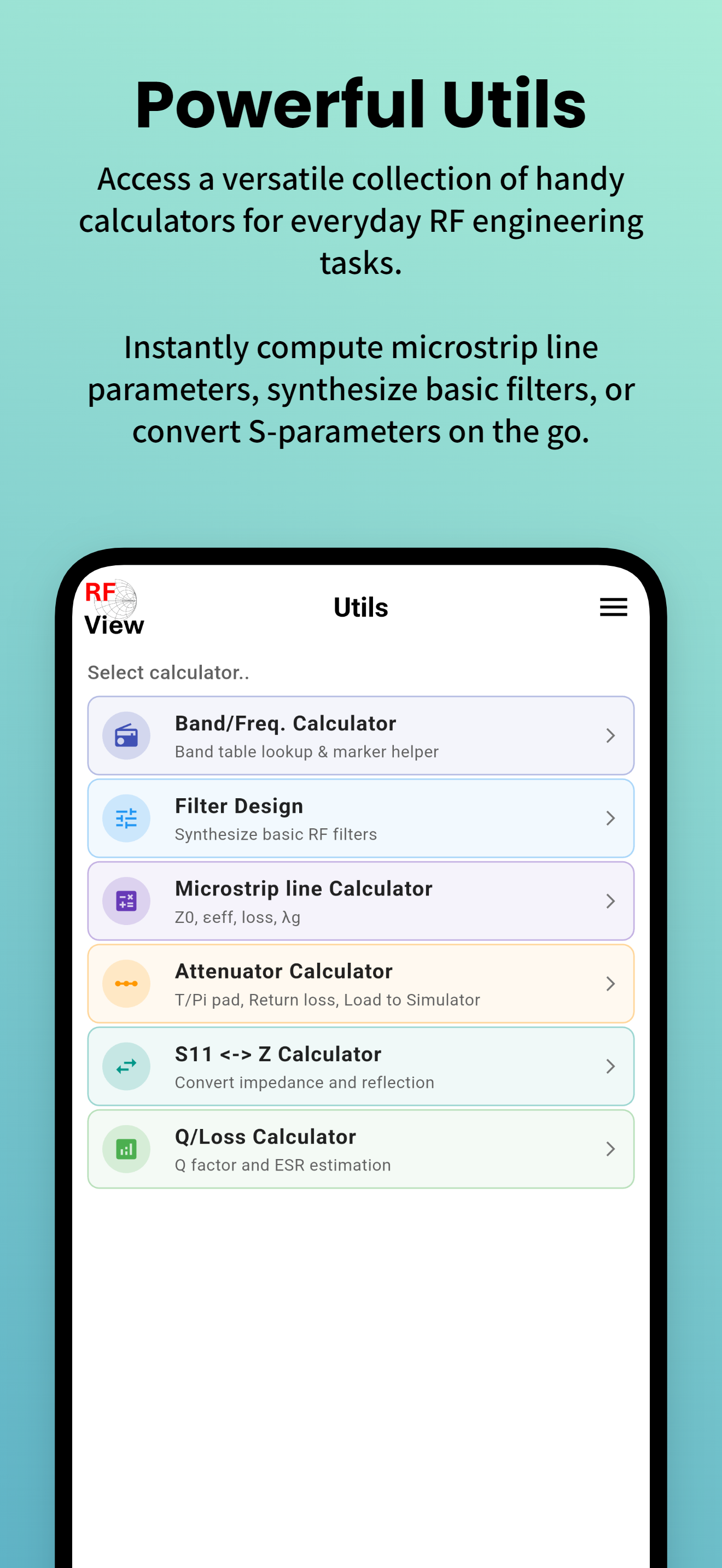
RF Utilities &
Calculators
Watch RF View in Action
Short YouTube demos showcasing key features of RF View. See how quickly you can go from raw S-parameter data to a matched circuit.

RF View Desktop Overview
Full walkthrough of RF View for Windows — S-parameter plot, VNA control, circuit simulator & analysis

RF View App Intro
S-parameter, Smith Chart & Auto Impedance Matching overview

One-Click Auto S2P Matching
Instantly generate a matching network from any S2P file

1-Click GaN HEMT Matching
L/C & Microstrip impedance matching for GaN power amplifiers

S-Parameter Port Change
Remap and reorder S-parameter ports in seconds
Free RF Engineering Reference Library
300+ in-depth articles, calculators, and guides — written for working RF engineers.
50+ terms defined: S11, VSWR, Smith chart, noise figure, Q factor, Touchstone format, and more — with formulas and practical examples.
Step-by-step guides: L-network design, Smith chart interpretation, batch SNP processing, Monte Carlo simulation, VNA measurement, and more.
Interactive calculators: VSWR↔Return loss, microstrip impedance, attenuator (T/Pi), L-network matching, noise figure cascade, and more.
S-parameter analysis guides for LNA, PA, SAW/BAW filters, duplexers, couplers, baluns, circulators, RF cables, and PCB substrates.
In-depth theory: why 50 Ω, power waves, Bode-Fano limit, stability analysis, ABCD matrix, phase noise, VNA calibration, and more.
Practical answers: what S11 is good for an antenna, VSWR causes, acceptable insertion loss, SNP file format, and how to use RF View.
Choose Your Plan
One-time purchase. No subscription. No recurring fees. Works on both Windows Desktop & Android.
Free
Always free · Windows & Android
- ✓ S-Parameter Plot
- ✓ Smith Chart
- ✓ Circuit Simulator
- ✓ SNP Converter & Batch
- ✓ RF Calculators
- ✕ Multiple Traces & Markers
- ✕ VNA Direct Control
- ✕ Batch Analysis Tab
- ✕ Gen PPT Report
- ✕ Real Component Matching
Pro
one-time · 2 devices · lifetime updates
- ✓ Everything in Free
- ✓ Multiple Traces & Markers
- ✓ VNA Direct Control (ENA / PNA)
- ✓ Batch Analysis Tab
- ✓ Auto PowerPoint Report (Gen PPT)
- ✓ Marker Table → CSV Export
- ✓ Real Component Matching (Murata)
- ✓ Graph Config Save (.pcf / .pcfs)
- ✓ Lifetime Updates
License key by email · Activate in-app
Start Analyzing RF Signals Today
Free to download. No sign-up required. Upgrade to Pro anytime with a one-time purchase.
Windows 10/11 64-bit · Android 8.0+ · One-time Pro purchase · No subscription